
Cache-Control headers for a modern front end: a recipe for every kind of file
The right cache makes a site fast and a server calm. The wrong one shows one user's cart to another.
Co-founder, Parslinks · Team, marketing & infrastructure
For its Yalda night campaign, a cosmetics shop put a CDN in front of the site and, for extra speed, switched on "cache everything". At 10pm, support gets a strange message: "Why is my cart full of products I didn't add?" The CDN had cached one user's cart page and was showing it to others.
Caching is one of the strongest speed tools there is, and one of the most dangerous if you don't know who keeps each response and for how long.
The words of Cache-Control
max-age=N: the browser (and CDN) may reuse the response for N seconds without asking the server.s-maxage=N: the same, but only for shared caches like CDNs. Browsers ignore it.stale-while-revalidate=N: after expiry, serve the old copy instantly for up to N seconds while fetching a fresh one in the background.immutable: this file never changes; don't re-check it even on reload.no-cache: keep it, but ask the server before every use whether it's still valid.no-store: don't keep it at all.private: only the user's own browser may keep it, not a CDN.public: any cache may keep it.
A recipe for each kind of response
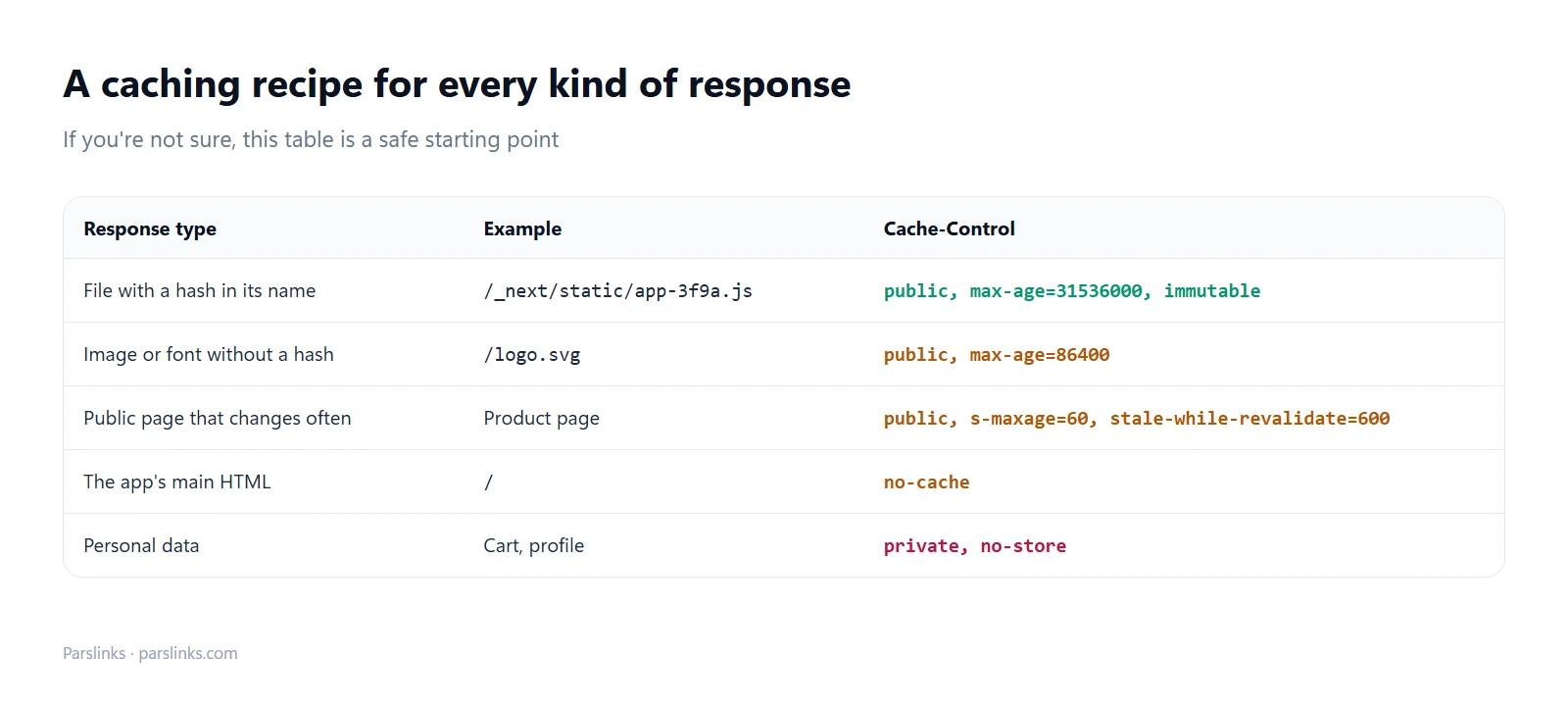
Hashed files: one year, immutable
Modern build tools name JS and CSS files with a content hash (app-3f9a.js). If the content changes, so does the name. A file with a given name never changes, so it can be cached forever. Next.js already does this for its own /_next/static.
The main HTML: no-cache
HTML is the page that points to the hashed files. If HTML is cached, users keep pointing at the old files after a new release. no-cache means the browser asks every time, and if nothing changed the server answers with a tiny 304.
Public pages that change often: short CDN cache, stale-while-revalidate
A product page is the same for everyone but its price and stock change sometimes. s-maxage=60, stale-while-revalidate=600 means the CDN keeps it for a minute, then serves the previous copy instantly for up to ten minutes while refreshing in the background. Users never wait for a page to be built.
Personal data: private, no-store
The cart, the profile, orders, and any response that depends on the user's cookie or token. No shared cache should ever keep it.
Cache web fonts properly
Persian web fonts are usually heavy and used on every page. If the file name has no version or hash (Vazirmatn.woff2), you want it not to download on every visit but also not to get stuck after an update: either version the name (Vazirmatn-v33.woff2) and make it immutable for a year, or use max-age=2592000 (a month).
Check what actually happens
After every change, look at the real headers, not your config:
The Age header shows how many seconds a response has been cached; if you see a number above zero on a personal route, something is wrong.
Frequently asked questions
Join the discussion
No comments yet. Be the first to share your thoughts.
Related posts
- Deploy
Deploying Next.js to production: what SSG, ISR and SSR each need from your infrastructure
Each page's rendering mode decides what your server has to do. This post covers what SSG, ISR, SSR and PPR need from your infrastructure, how standalone output works, and what breaks once the app runs on more than one instance.
- Guides
Yalda night sales and Nowruz traffic: getting your site ready for the hour everyone shows up
The sale SMS goes out at 9pm, and in the first five minutes you get ten times a normal day's traffic. This post covers what breaks first under that load, how to load-test properly, and what to do from two weeks before until the morning after.
- Guides
Automatic SSL: issuing, renewing, and the TLS errors that still scare users away
Let's Encrypt certificates are free and valid for 90 days, which means four chances a year to forget. This post explains how automatic issuing and renewal work, what common browser errors actually mean, and how to find and fix each one fast.