
Rollback in 30 seconds: why going back shouldn't depend on a rebuild
When payments are failing, every minute spent rebuilding the previous version is a minute customers spend leaving.
Co-founder, Parslinks · Team, marketing & infrastructure
Wednesday, 2pm. A new version of the shop goes out, and five minutes later the first message from support arrives: "Payments aren't coming back." After paying successfully at the gateway, users land on a 500 page. Their money is gone; their order isn't saved.
The team makes the right call: roll back first, investigate second. The developer reverts the last commit and pushes. CI is queued: two minutes. Installing dependencies: three. Build: four. Deploy: two. About twelve minutes later the site is back to its previous state. In those twelve minutes, thirty-odd more payments hit the same error page, and support spends the rest of the day issuing refunds.
Nothing in that process was broken. It just wasn't designed for the moment when speed matters most.
Two kinds of rollback
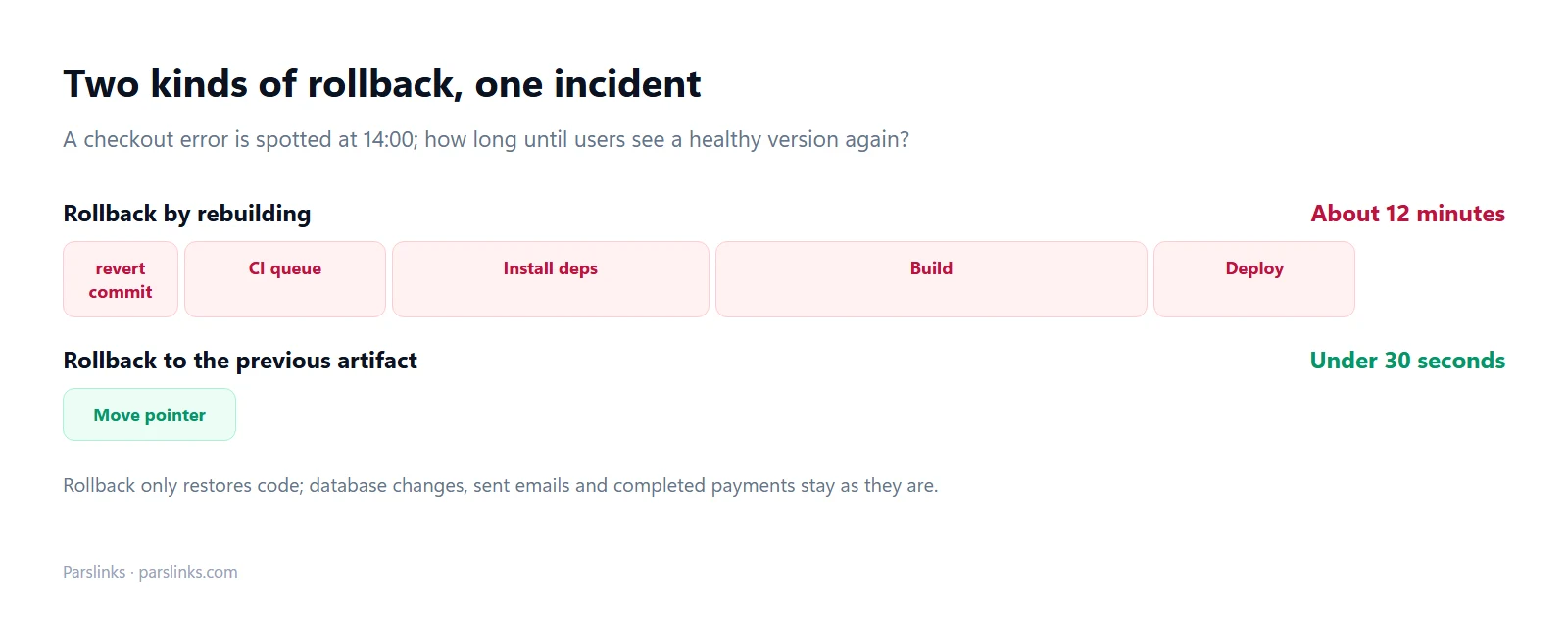
Rolling back by rebuilding
You build the old code again. Three problems:
It's slow. Every CI and build step that's tolerable for a normal release turns into lost minutes during an incident.
It may not be the same thing. Today's build of yesterday's commit isn't necessarily yesterday's build. If a dependency released a new version in the meantime, or the npm mirror is unreachable, the "previous version" either comes out different or doesn't build at all.
It depends on the build pipeline being healthy. If the problem came from a change to the build process itself, the rollback fails too.
Rolling back to the previous artifact
Every deploy is an independent, immutable artifact: the built code, its dependencies and its settings. Production simply points at one of them. Rolling back means pointing at the previous artifact, which still exists and already ran in production. No build, no queue: seconds.
On Parslinks, every deployment is kept this way, and from the deployments list you can point production back at any earlier version in one click.
What doesn't come back
Rollback restores code, not the world. Know this list before an incident, not during one:
| Thing | Restored by rollback? | What to do |
|---|---|---|
| Code and static files | Yes | — |
| Build-time environment variables | Yes, with the artifact | — |
| Database schema (migrations) | No | Write migrations compatible with the previous version |
| Data the broken version wrote | No | Identify and fix with a separate script |
| SMS and emails already sent | No | A correction message, if needed |
| Payments completed at the gateway | No | Reconcile with the gateway report; refund or create orders manually |
| Jobs already queued | No | Check the queue; the previous version's worker may not understand them |
The most important row is the database. If the new version dropped or renamed a column, the previous version will look for a column that no longer exists after rollback, and the rollback itself causes a new outage. The fix is the expand/contract pattern: make database changes in several small, compatible releases, so every version works with the current schema. We cover it in zero-downtime deployments.
After the rollback
The incident doesn't end with the rollback. Write the follow-up list in advance so nobody forgets it under pressure:
- Tell support it's fixed and which time window was affected.
- Reconcile payments: compare the gateway's successful transactions in that window with saved orders. Any payment without an order is either created manually or refunded.
- Reproduce the bug on a preview using the broken version, not in production.
- Write a short note on what happened, how you found out, and what would have shown it sooner.
A simple drill
This week, at a quiet hour, practise a rollback: move production to the previous version, note how long it took and what broke, then move back to the current one. A team that only rolls back on incident day learns on incident day that it doesn't work.
Frequently asked questions
Join the discussion
No comments yet. Be the first to share your thoughts.
Related posts
- Deploy
Zero-downtime deployments in practice: rolling, blue/green, and promoting the same artifact
A restart is the simplest way to deploy, and the seconds the service is down are the seconds orders fail. This post lists where downtime really comes from, compares three common release strategies, and shows how to change your database without an outage.
- Platform
A Vercel alternative for teams in Iran: what it actually has to replace
Foreign-card payments, the risk of a suspended account and unreliable access to vercel.app push teams in Iran to look elsewhere. But renting a server and running next start covers only a small part of what Vercel did. Here is the full list, and how the alternatives compare.
- Guides
Environment variables and secrets: from a .env on your laptop to production
Why does a key you marked "hidden" in your dashboard show up in your site's JavaScript? The difference between build-time and runtime variables, separate values for each environment, and what to do in the first minutes after a key leaks.